
7 Best Text-to-Video AI Tools with Free Credits & No Watermarks (2026)
The 7 best free AI text-to-video generators with no watermarks in 2026 — ranked by workflow completeness, free credit generosity, output quality, and whether the free tier actually lets you export clean video.

The best free AI text to video generators with no watermark — ranked for 2026
The biggest frustration with free AI text to video generators isn't the credit limits — it's the watermark. You spend 10 minutes writing a script, wait for the render, and the output has a platform logo burned into the corner that makes the video unpublishable. You either pay to remove it or start over with a different tool.
This list cuts through that problem. The seven tools below all offer free credits and export clean video without watermarks on their free plans — with honest notes on the one exception. They're ranked by how useful the free tier actually is: how much you can generate, whether the workflow handles full script-to-video or just single clips, and whether the output is ready to publish without extra editing work.
What actually matters when choosing a free text-to-video AI tool
Not all "free" tiers are equal. Here's what separates a genuinely useful free plan from a frustrating demo:
- No watermark on export — The baseline requirement. A watermarked free tier is a trial, not a usable tool.
- Text or script input — True text-to-video means starting from written content, not just image prompts. For YouTube automation, faceless video creation, and script-driven workflows, this is the key capability.
- Full video assembly vs. single clips — Some tools generate one clip per prompt. Others produce a complete multi-shot video from a script. The latter is far more useful for publishing-ready output.
- Free credit volume — Enough to test the workflow thoroughly and produce a finished video, not just a 3-second preview clip.
- Output resolution — Free tiers that cap at 360p aren't useful for publishing to YouTube or TikTok. 720p or better on the free plan matters.
#1 VidFab.ai — Best free text-to-video AI with full story pipeline & no watermark
VidFab is the strongest free AI text to video generator with no watermark in 2026 for one reason that no other tool on this list matches: it converts a written script into a complete, assembled video — not just a single generated clip.
How the free workflow works
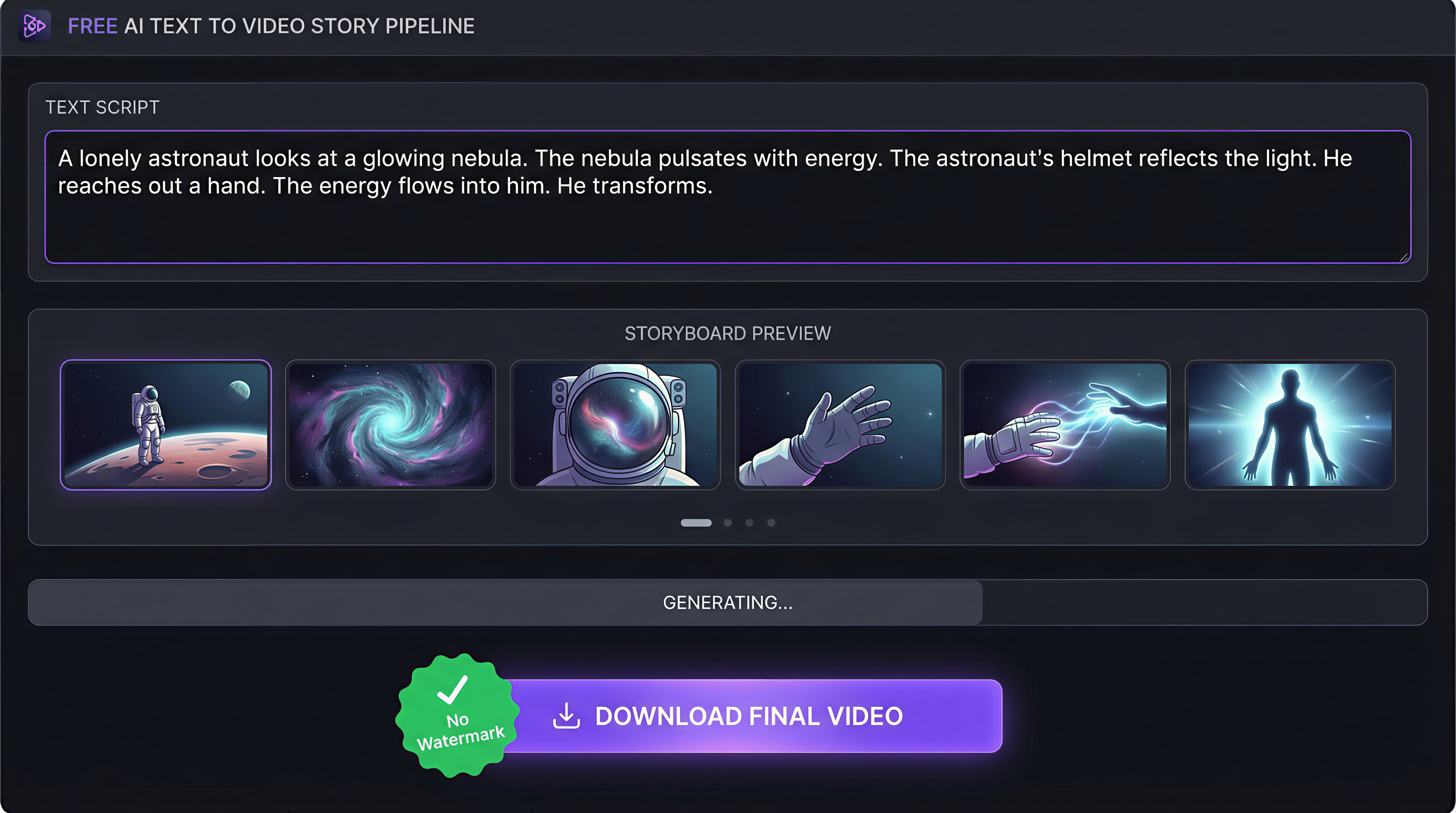
VidFab's Story-to-Video Workflow runs a full production pipeline on your script. Gemini 3 Flash analyzes the text and generates a structured shot breakdown — for a 30-second video, that's six shots with time ranges, visual descriptions, and optimized generation prompts. You review and approve the shot plan, then Seedream 5.0 generates a storyboard preview frame for each shot. Swap any frame you don't like without regenerating the others. Final video assembly runs automatically.
The free plan covers this entire pipeline: script analysis, storyboard generation, video assembly, and download. The exported video has no watermark.
Why it matters for script-to-video workflows
Every other tool on this list requires you to generate clips one prompt at a time and assemble them yourself. VidFab's free tier produces a finished, edited video from a script input — the gap in workflow completeness is significant for YouTube automation creators, faceless channel operators, and anyone producing short-form content at volume.
Character consistency on the free plan
VidFab's Identity Lock feature is available on the free tier. Upload a reference photo of your character and every generated frame carries those visual traits automatically. For creators building a recurring AI persona across a series of videos, this is the feature that makes a faceless channel consistent at scale — and it doesn't require a paid plan to use.
Free plan specifications
- Watermark: None
- Output formats: 9:16 (Shorts/TikTok), 16:9 (YouTube), 1:1
- Durations: 15s, 30s, 45s, 60s
- Visual styles: Realistic, Anime, Cinematic, Cyberpunk
- Entry modes: Write script, analyze a YouTube reference video, or generate AI script concepts
Best for: Script-to-video workflows, faceless video creation, YouTube automation, short-form content at scale.
Try VidFab free — no watermark, no credit card
Paste a script, pick a style, review the storyboard, and download your clean video.
Start Story-to-Video Free →#2 Kling AI 2.0 — Best free tier for realistic motion clips
Kling AI, developed by Kuaishou, offers one of the most generous free tiers among premium AI video generators. Free accounts receive monthly credits that refresh automatically — enough to produce multiple complete clips per month at no cost. Exports on the free plan carry no watermark.
Kling 2.0's technical strength is realistic human motion — natural walking, expressive gestures, and body dynamics that competing models struggle to match. For TikTok content featuring human subjects or physical action, Kling's output quality on the free tier is genuinely competitive with paid tiers on other platforms.
The limitation is workflow depth: Kling generates individual clips from image or text prompts. There's no script analysis, no shot planning, and no automated assembly. If you want a complete 30-second video from a script, you'll generate clips one at a time and edit them together externally.
Free plan: Monthly credits, no watermark, 720p output on free tier.
Best for: Single high-motion clips, TikTok content with human subjects, B-roll generation.
Limitation: No script-to-video pipeline, manual assembly required.
#3 Pika 2.0 — Best for quick social content with daily free credits
Pika is consistently the most accessible entry point for creators new to AI video. The interface is minimal, onboarding is fast, and the free tier provides daily credits that reset every 24 hours — a model that favors regular creators over one-time users. Exports are clean with no watermark on the free plan.
Pika 2.0 introduced Pikaffects — stylized transformation effects (inflate, deflate, explode, melt) that produce visually striking moments well-suited to social media hooks. These aren't narrative tools, but for a specific visual effect or trend-driven clip, they work well within the free daily credit allowance.
Free plan: Daily credits (resets every 24h), no watermark, solid output quality.
Best for: New creators, fast turnaround, trend-driven short clips, social media hooks.
Limitation: No script analysis, no multi-shot assembly, daily credit limit can be restrictive for high-volume creators.
#4 Haiper 2.0 — Most generous free tier (unlimited standard videos)
Haiper takes a different approach to free access: unlimited standard-quality video generation with no watermarks, no daily caps, and no credit system to manage. You can generate as many videos as you want on the free plan, with a queue system that prioritizes paid users during peak hours.
The trade-off is output ceiling: Haiper's standard quality tier produces good results for social content but doesn't match Kling or Runway at the top of the quality scale. For creators who need volume over peak quality — testing scripts, iterating on concepts, or producing content for platforms where 4K resolution isn't the differentiator — Haiper's unlimited free access is a meaningful advantage.
Text-to-video input is supported: describe what you want in words and Haiper generates the clip. Like most tools on this list (except VidFab), there's no multi-shot pipeline — one prompt produces one clip.
Free plan: Unlimited standard quality, no watermark, queue-based access.
Best for: High-volume testing, iteration, creators who need to generate many concepts quickly.
Limitation: Quality ceiling below premium tools, slower generation during peak hours, no script pipeline.
#5 PixVerse v3 — Solid free credits with strong visual quality
PixVerse v3 combines competitive output quality with a reasonable free credit allocation. New users receive a batch of credits on signup, with additional free credits available through daily tasks and referrals. The free plan exports at full resolution with no watermark.
PixVerse handles text-to-video input well — the model interprets descriptive text prompts accurately and produces visually coherent results across a range of styles. The platform's character reference feature allows basic character consistency, though it's less reliable than VidFab's Identity Lock for maintaining precise visual traits across multiple clips.
Free plan: Signup credits + daily task credits, no watermark, full resolution export.
Best for: Quality-focused single clips, style variety, creators who want more visual control over outputs.
Limitation: Free credits require active engagement (daily tasks) to accumulate, no automated multi-shot assembly.
#6 Luma Dream Machine (Ray 2) — Best for photorealistic short clips
Luma's Dream Machine, powered by the Ray 2 model, produces some of the most photorealistic AI video outputs available on a free plan. The motion physics are accurate, lighting is coherent, and complex subjects like water, fabric, and natural environments render with unusual fidelity.
Free accounts receive a monthly credit allocation — enough for several high-quality clips per month. Exports have no watermark. The primary limitation for text-to-video workflows is the same as most tools here: Dream Machine generates individual clips from prompts, not assembled multi-shot videos from scripts. For individual cinematic clips, the quality ceiling on the free plan is hard to beat.
Free plan: Monthly credits, no watermark, exceptional quality on photorealistic subjects.
Best for: Cinematic single clips, photorealistic subjects, creators who prioritize visual fidelity above everything else.
Limitation: Monthly credit limit is relatively low, no script-to-video workflow.
#7 Runway Gen-4 — Best quality ceiling, but free tier adds watermark
Runway is the only tool on this list where the free tier adds a watermark — and it's included because the quality ceiling is high enough that many creators use it despite the limitation. The Gen-4 model produces sophisticated motion, handles complex prompts accurately, and renders environments that look genuinely cinematic.
Runway offers a free trial with limited credits. Exports from the free plan carry a visible Runway watermark. To export clean video, a paid subscription is required. This makes Runway a poor fit for the "free no watermark" criteria, but it's worth knowing as a next step once you're ready to invest in premium quality for specific high-stakes clips.
Free plan: Trial credits, watermark on export (paid plan required for clean export).
Best for: Creators ready to invest in premium quality, cinematic B-roll, commercial-grade short clips.
Important: Not a genuinely free no-watermark option — listed here for completeness and as a quality reference point.
Quick comparison: free tier & watermark status at a glance
- VidFab — Free tier, no watermark, script-to-video pipeline, character consistency
- Kling AI 2.0 — Free monthly credits, no watermark, best motion quality
- Pika 2.0 — Free daily credits, no watermark, lowest friction for new creators
- Haiper 2.0 — Unlimited free standard quality, no watermark, best for volume
- PixVerse v3 — Free signup + daily task credits, no watermark, strong visual control
- Luma Dream Machine — Free monthly credits, no watermark, best photorealism
- Runway Gen-4 — Free trial only, watermark on free exports, highest quality ceiling
For a complete free text to video AI workflow — script in, finished video out, no watermark, no editing required — VidFab is the only tool on this list that closes the full loop on the free plan.
How to create a watermark-free video from text with VidFab
Here's the step-by-step process for generating a clean, published-ready video from a text script on VidFab's free plan:
Step 1: Open Story-to-Video
Go to VidFab's Story-to-Video Workflow. Choose Create by myself to paste your script, or Create by reference to analyze the structure of an existing YouTube video and generate an original script inspired by it.
Step 2: Write or paste your script
For a 30-second video, aim for 80–100 words with a clear hook, middle, and close. The more visual your language, the more precise the AI shot planning will be. If you don't have a script, use the AI inspiration tool to generate five complete concept ideas from your topic or niche.
Step 3: Set your format
Choose aspect ratio (9:16 for Shorts/TikTok, 16:9 for YouTube), duration (15s, 30s, 45s, 60s), and visual style (Realistic, Anime, Cinematic, Cyberpunk). If you're using a character, upload a reference photo to activate Identity Lock before generating.
Step 4: Review the shot breakdown
Gemini 3 Flash analyzes your script and produces a structured shot plan. Read through each shot's visual description and generation prompt. Edit anything that doesn't match your intent at this stage — it's the cheapest point to make changes before images are generated.
Step 5: Approve the storyboard
Seedream 5.0 generates a rendered preview frame for each shot. Review the full sequence. Regenerate individual frames you want to change without touching the rest of the board.
Step 6: Download — no watermark
Video clips are generated and assembled automatically from the approved storyboard. Download your finished video. No watermark, no extra steps, ready to upload to YouTube Shorts, TikTok, or any platform.
Start your first free video — script to clean export in minutes
No watermark. No credit card. The full story-to-video pipeline, free.
Open VidFab Free →The free AI text to video landscape in 2026
The good news: genuinely useful free AI text to video tools with no watermarks exist in 2026, and several of them are competitive with tools that cost money. The watermark problem that made early free tiers unusable is largely solved — with the notable exception of Runway, which still gates clean export behind a paid plan.
The distinction that matters most is workflow depth. For individual clips — B-roll, showcase moments, visual concepts — Kling AI, Luma Dream Machine, and PixVerse all deliver strong results without watermarks on free plans. For creators who need a complete pipeline from script to finished video, VidFab is the only free option that handles the full sequence: script analysis, shot planning, storyboard preview, and automated assembly, all in one place with no watermark on the output.
If you're building a YouTube channel, running a faceless content workflow, or publishing Shorts at volume, the tool that saves you the most time isn't the one with the highest single-clip quality — it's the one that closes the most steps in your production pipeline on the free plan.

