
How to Convert YouTube Videos into Original Shorts Using AI (2026 Guide)
Two AI strategies for turning YouTube content into Shorts in 2026: auto-clipping tools that cut your long videos, and VidFab's viral structure analyzer that studies what's already working and helps you create original short-form content inspired by it.

How to use AI to convert YouTube videos into Shorts — two strategies that actually work
Using AI to convert YouTube videos to Shorts is now one of the fastest-growing tactics in short-form content strategy. But the term covers two very different workflows, and most guides conflate them — leading creators to pick the wrong tool for what they're actually trying to accomplish.
The first strategy is clipping: take your own long YouTube video, feed it to an AI tool, and let it identify and extract the best 30–60 second moments as vertical Shorts. Tools like Opus Clip and Vidyo.ai are built for this. If you have a library of long-form content and want to repurpose it efficiently, this is your path.
The second strategy is analyze and recreate: study a viral Short that's already working, understand why it works structurally, and use that framework to generate original AI video content inspired by it. This is what VidFab's reference mode does — and it's a fundamentally different approach that produces original content instead of re-cut clips.
This guide covers both strategies, the best tools for each, and when to use which.
Clipping vs. recreating: which strategy fits your workflow?
Before choosing a tool, the right question is: what are you starting from?
- You have long-form content you've already produced — long YouTube videos, podcast recordings, webinars, interviews. You want to extract Short-worthy clips without watching every minute. → Use a clipping tool (Opus Clip, Munch, Vidyo.ai).
- You're starting from scratch — you want to create new Shorts, you've identified viral formats that perform well in your niche, and you want to create original AI video content that follows those proven structures. → Use VidFab's reference mode.
- You want to do both — use clipping tools for your existing library, and VidFab to generate fresh original content alongside it.
The key difference: clipping tools repurpose footage you own. VidFab's analyze-and-recreate approach doesn't touch the source video at all — it reads the narrative structure, then generates a brand-new AI video. No copyright issues, no re-used footage.
VidFab — Best for analyzing viral Shorts and creating original AI video content
VidFab's "Create by reference" mode is the only free AI tool built specifically for the analyze-and-recreate strategy. Paste a viral YouTube Shorts URL (under 1 minute, ideally a visual storytelling video without heavy dialogue), and Gemini 3 Flash maps the video's narrative architecture: how many shots it uses, how long each shot runs, what the visual story beats are, and how the pacing builds across the clip.
That analysis becomes the structural blueprint for a new, original script. VidFab doesn't copy or re-use a single frame from the source video — it extracts the pattern of what's working and applies it to fresh AI-generated content. The output is a new 9:16 video produced entirely through the Story-to-Video pipeline.
What the workflow looks like
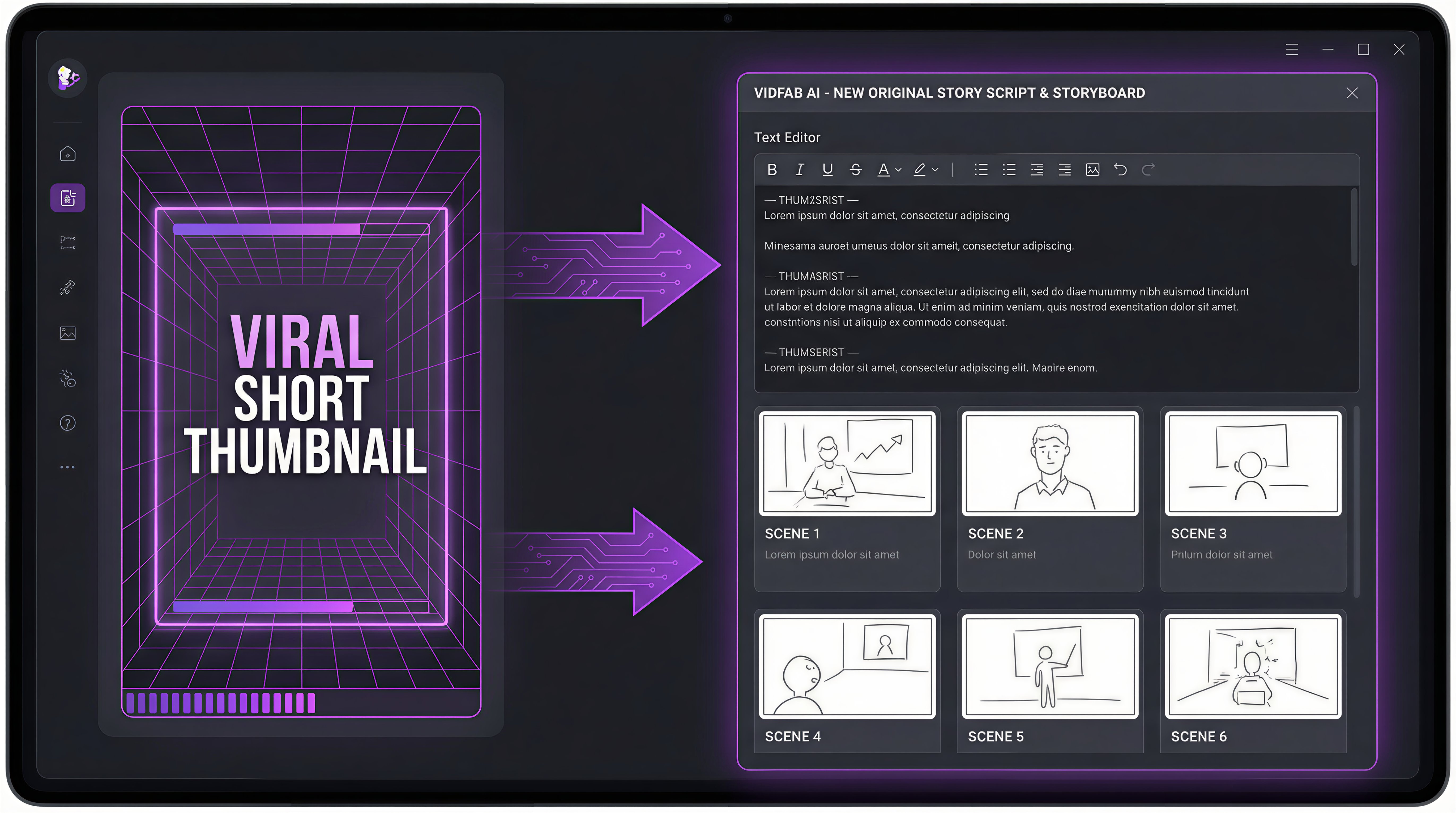
After VidFab analyzes the reference Short, you get a complete project with:
- A structured shot breakdown modeled on the reference video's pacing and narrative arc
- Auto-generated character prompts based on the visual style of the source
- A storyboard you can review and modify before video generation begins
- A finished 9:16 video assembled automatically from the approved storyboard
You can adjust the story style, duration, and visual style before generating — so the structural inspiration stays while the content becomes uniquely yours.
What VidFab's reference mode is designed for
- Faceless channel operators who want to produce Shorts that follow formats proven to perform in their niche, without filming anything
- YouTube automation creators who study what's going viral and need a systematic way to produce original content at the same pace
- New creators building a library of Shorts who want AI to handle the production while they handle the strategy
Current constraints to know
- Only supports YouTube Shorts URLs (under 1 minute) — not long-form video analysis
- Works best with visual storytelling videos; heavy dialogue-only content produces weaker results
- Output is locked to 9:16 vertical format in reference mode
- Requires credits — free plan includes enough to run the full workflow and produce multiple videos
Best for: Creating original Shorts inspired by proven viral formats, faceless video creation, YouTube automation from reference analysis.
Analyze a viral Short and create your own original version
Paste a YouTube Shorts URL, let Gemini 3 Flash map its structure, and get a new original AI video in minutes.
Try VidFab Reference Mode →Opus Clip — Best AI tool to clip long YouTube videos into Shorts
Opus Clip is the leading AI clipping tool for creators who want to convert existing long-form YouTube content into vertical Shorts. Paste your YouTube video URL, and Opus Clip's AI scans the transcript and engagement signals to identify the most quotable, hook-worthy, or emotionally resonant segments. It then extracts them as vertical clips with auto-generated captions, emoji overlays, and an engagement score for each clip.
The free plan allows a limited number of monthly clip exports. Captions are accurate for most clear speech. The AI's clip selection is good but not perfect — you'll occasionally need to override its choices and manually define clip boundaries, which the editor supports.
Best for: Long YouTube video repurposing, podcast-to-Shorts workflows, any creator with existing long-form content to distribute as short clips.
Free tier: Limited monthly minutes of video processing.
Limitation: Requires existing video footage to clip from — doesn't generate new content.
Munch — Best for engagement-scored clip extraction
Munch adds a layer of social intelligence on top of AI clipping. It doesn't just identify good clips from your long video — it scores each clip against current engagement trends on YouTube Shorts, TikTok, and Instagram Reels, suggesting which clips are most likely to perform on each platform and why.
The interface is polished and the clip quality is strong. Munch works well for brands and agencies managing multiple creators who need to justify clip selection decisions with data rather than intuition. The free tier is limited, and the paid plans are priced for professional use rather than individual creators.
Best for: Agency use, multi-platform content distribution, creators who want data-backed clip selection.
Free tier: Trial credits, limited exports.
Limitation: Higher price point than alternatives, requires existing footage.
Vidyo.ai — Best free auto-clipping with captions
Vidyo.ai offers one of the more generous free tiers in the clipping category. Upload your long video or paste a YouTube URL, and Vidyo automatically identifies clip-worthy segments, reformats them to vertical, and adds styled captions. The caption quality and clip selection are competitive with tools that cost significantly more.
For creators who prioritize captions — critical for Shorts that play without sound — Vidyo's auto-caption styling is one of its strongest features. The free plan covers enough monthly video processing for creators producing Shorts from existing content at a moderate pace.
Best for: Caption-forward Shorts, budget-conscious creators repurposing long-form content, getting started with video repurposing without a paid commitment.
Free tier: Monthly processing minutes, no watermark on free plan.
Limitation: Clip selection AI is less sophisticated than Opus Clip at the top end, requires existing footage.
YouTube Studio clip feature — Free, but manual
YouTube Studio has a built-in clip tool that lets you trim and share segments from any YouTube video as a short clip. It's free, requires no third-party account, and works directly from your creator dashboard. There's no AI involvement — you manually set the start and end points of the clip.
For occasional use, this is the zero-friction option: no upload, no processing time, just mark the segment and share. For any creator producing Shorts at volume, the manual process doesn't scale, and the output quality and vertical reformatting options are more limited than dedicated tools.
Best for: Occasional clips, testing whether a segment is worth turning into a Short before investing in a dedicated tool.
Limitation: No AI, no auto-captioning, no vertical reformatting, manual process only.
How to analyze a viral Short and create original content with VidFab
Here's the step-by-step process for VidFab's reference mode — from finding a viral Short to downloading your original AI-generated video:
Step 1: Find a viral Short worth studying
Look for a Short in your niche with strong engagement relative to channel size — high view-to-subscriber ratio is a better signal than raw view count. Choose a visual storytelling video with clear narrative structure and minimal reliance on the creator's voice or face. Non-dialogue videos with strong visual pacing work best in reference mode.
Step 2: Open VidFab reference mode
Go to VidFab's Story-to-Video Workflow and select Create by reference. Paste the YouTube Shorts URL into the input field. Set your visual style preference (Realistic, Anime, Cinematic, or Cyberpunk) and configure background music on or off.
Step 3: Let Gemini 3 Flash analyze the structure
Click Analyze Video. Gemini 3 Flash processes the Short — analyzing its shot count, timing, visual narrative arc, and character composition. This typically takes 1–2 minutes. The output is a structured shot breakdown for your new original video, modeled on the analyzed video's pacing but with entirely new content.
Step 4: Review the generated shot plan
VidFab creates a new project with the analyzed structure as its foundation. Review the shot breakdown — you can edit any shot description or visual prompt before storyboard generation begins. Adjust the story direction as needed while keeping the underlying structural rhythm that made the reference video work.
Step 5: Review the storyboard and generate
Seedream 5.0 generates a visual preview frame for each shot. Review the storyboard — regenerate any frame that doesn't match your intent. Once approved, the video clips are generated and assembled automatically as a 9:16 Short.
Step 6: Download your original Short
Download the finished 9:16 video — ready to publish on YouTube Shorts. No re-used footage, no copyright exposure, no watermark.
Turn viral Shorts into original AI content with VidFab
Analyze the structure. Generate the script. Produce a new original 9:16 Short — free to try.
Open Story-to-Video →Which approach fits where you are right now?
The best AI tool to convert YouTube videos to Shorts depends on what you're working with. If you have a library of long-form content that's sitting underutilized, Opus Clip or Vidyo.ai will turn it into Shorts faster than any manual editing workflow. If you're building from scratch, studying what's already performing and creating original AI-generated Shorts around those structures is the higher-leverage strategy — and VidFab is the only free tool built to run that workflow end to end.
The creators who win on YouTube Shorts in 2026 aren't just clipping and hoping. They're studying what works, understanding why it works structurally, and producing original content at the pace those formats demand. The tools to do both are free. The strategy is the differentiator.

